




Working with SmartBug Media to connect your HubSpot instance and Microsoft Dynamics 365 CRM is painless:
Step 1: Register your account with SmartBug Media.
Simply click “Connect App” in the HubSpot App Marketplace. You will be taken to SmartBug Media and asked to fill out a quick form.
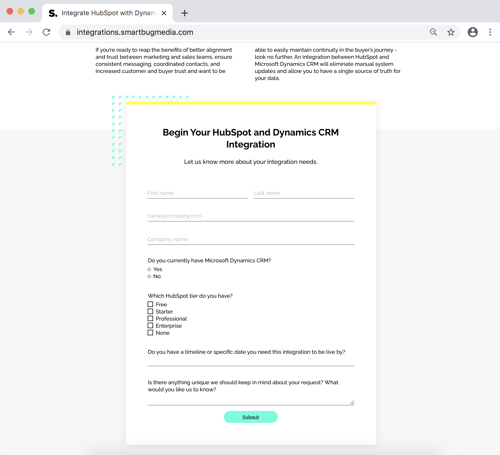
Clicking “submit” will create your account with SmartBug Media.
Step 2: Connect your HubSpot account.
Once you’ve filled out the form, a button should appear in its place. Click on “Authorize My Portal” to begin connecting your HubSpot portal to the Dynamics 365 Integration app.
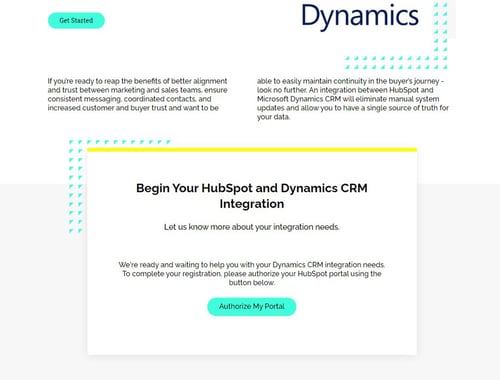
Clicking "Authorize My Portal" will take you to your HubSpot instance where you will be asked to give authorization for connecting the app. For data privacy reasons, we will not gain access to data within your HubSpot CRM at this step.
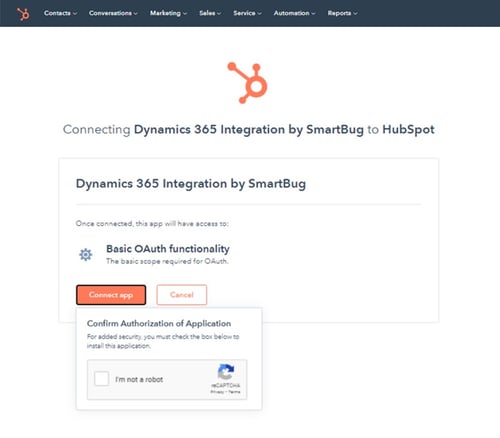
When you click "Connect app" you will be taken to another page within your HubSpot instance where you will select your portal.
Step 3: We will contact you.
To complete your setup our Web and Integration Services Sales Executive, Chris Forhan, will contact you to discuss your integration needs in detail, including what Dynamics data you need integrated with HubSpot, the specific fields you need, and answer any additional questions you may have.
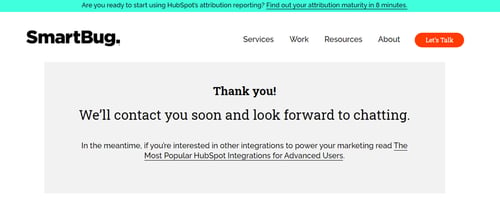
If you have questions or need help with setup, email integrations@smartbugmedia.com.